if you have recently ran a Google PageSpeed Insights test, you may have come across the red warning: "Serve images in next-gen formats.. This is the most prevalent reason that pulls down mobile performance scores in 2026.
What Does This Warning Actually Mean?
Google marks your site when Google identifies the classic image formats such as JPEG and PNG. Your pictures may be good but Google thinks they are bloated as they take more time to download and decode than the current versions such as WebP.
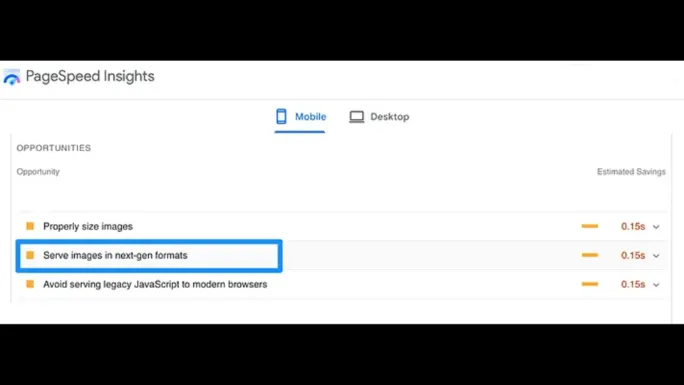
The dreaded "Serve images in next-gen formats" warning in a Lighthouse report.
How to Fix the Error Using NoLoginTool (3 Steps)
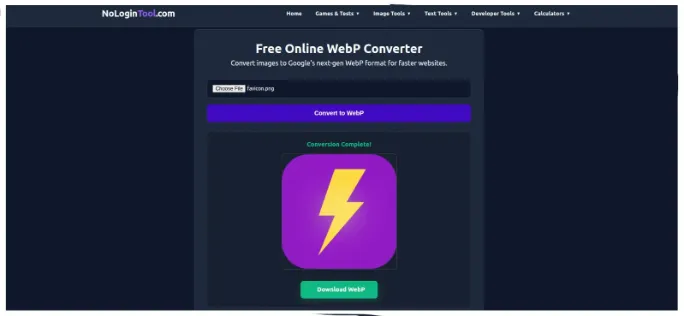
You don't need complex plugins or expensive software to fix this. You can satisfy Google's requirements in under 60 seconds using our client-side converter.
.webp files to your server and update your image tags. Run the PageSpeed test again; you will see the warning disappear and your performance score jump!
Why Not Just Use High Compression JPEGs?
You can just compress your JPEGs, however, that is not enough. With high compression you get artifacting (blurry blocks in your image). WebP has a better algorithm with edges and smooth gradients having a much lesser file size.
Eliminate the PageSpeed warning right now.
Fix My Images NowFinal Checklist for 2026 SEO
- Turn all the Hero and Banner images into WebP.
- Always include
widthandheightattributes in your pictures to avoid layout drifts (CLS). - Apply
loading="lazy"to below the fold images.
Verifying the Fix: How to Re-Test Properly
After converting, do not just reload the page and assume victory — PageSpeed Insights caches results and mixes lab data with 28-day field data. Run a fresh test in an incognito window, then open the "Serve images in next-gen formats" audit and confirm the listed savings dropped to zero or to files you deliberately excluded. Pay attention to which data set you are reading: lab results reflect your page as it exists right now, while the Core Web Vitals field section updates only as real Chrome users visit over the coming weeks. If the lab audit passes but field data still shows the warning, you fixed it — the field section simply needs time. Purge any CDN or page cache (Cloudflare, WP Rocket, LiteSpeed Cache) before re-testing, or you will measure the stale JPEG version and chase a ghost.
Why the Warning Persists After Converting
Four culprits account for nearly every stubborn case. CSS background images are invisible to most converter plugins — a hero set via background-image: url(...) must be converted and re-referenced by hand. Third-party widgets such as chat bubbles, review carousels, and ad slots load JPEGs from external domains you cannot control; the only remedies are lazy-loading them, replacing the widget, or accepting the small penalty. Missing responsive variants trigger the audit when a 2400 px image is served to a 390 px phone — add srcset with 480, 800, and 1200 px renditions so mobile users download appropriately sized files. Finally, favicons and Open Graph images occasionally get flagged; keep the favicon as a tiny PNG (it is exempt in practice due to size) and convert the OG image to JPEG at moderate quality since several social scrapers still mishandle WebP.
Next-Gen Format FAQs
Is converting to WebP enough to pass Core Web Vitals?
It resolves this specific audit and usually improves Largest Contentful Paint by several hundred milliseconds, but LCP also depends on server response time, render-blocking scripts, and font loading. Treat image conversion as the highest-return first step, then address JavaScript bloat and hosting speed.
Can I bulk-convert hundreds of WordPress images at once?
Yes. Export your media library or convert in batches with the free WebP Converter — it runs entirely in your browser with no upload limits — then re-upload and use a search-replace of file extensions in image URLs. Always back up the media folder first.
Does this warning affect Google rankings directly?
The audit itself is diagnostic, but the underlying metrics (LCP, and page experience signals generally) feed ranking. Pages that clear image audits consistently load faster, bounce less, and convert better — the ranking benefit follows the user-experience improvement.